
Inventor part-view output
IngeniDXF
Prepare and export DXF files from Inventor drawings.
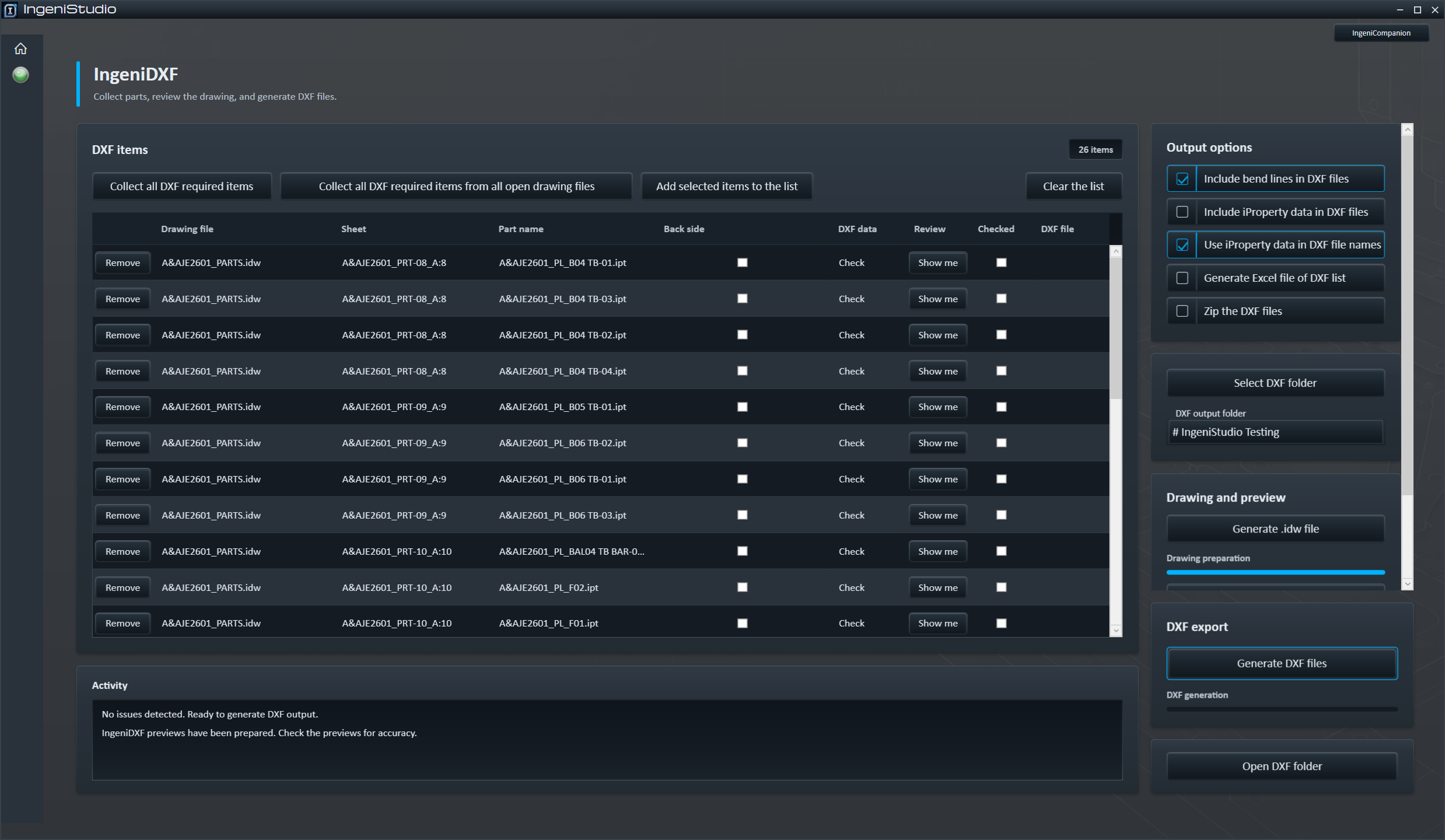
IngeniDXF collects part views marked for DXF output or views selected directly from an Inventor drawing. It prepares a drawing in Inventor so you can inspect the selected views before exporting DXF files to a folder you choose.
End-to-end workflow
Collect → Prepare → Review → Export
IngeniDXF provides an Inventor-based preparation and review process before eligible files are exported.
Build the list
Collect required part views from Inventor drawings or add selected part views manually.
Create the drawing
Create an in-session Inventor drawing with sheets for the items IngeniDXF can prepare.
Inspect the views
Inspect prepared views and resolve items flagged for user attention.
Create the outputs
Export eligible DXFs and optionally create an Excel DXF list and ZIP archive.
Collect
Build Your DXF List
Choose a collection route for required items or directly selected part views.
Collect all DXF required items
Scans the active Inventor drawing for part views marked as requiring DXF output.
Collect from all open drawings
Scans saved Inventor drawing documents currently open in Inventor for required DXF items.
Add selected items
Adds part views selected directly from the active Inventor drawing, whether or not they are marked as requiring DXF output.
- Assembly views are not added.
- The same part file is not added more than once.
- Remove individual rows or clear the complete list.
Prepare
Prepare the DXF Drawing
IngeniDXF creates a visible drawing in Autodesk Inventor so prepared views can be inspected before export.
Starts with Standard.idw
IngeniDXF uses the active Inventor project's Standard.idw as the basis for the preparation drawing and prepares it for DXF use before adding collected part views.
One sheet per prepared item
A sheet with a 1:1 view is prepared for each item IngeniDXF can successfully prepare. A failure is reported without preventing other items from being prepared.
Visible in Inventor
The drawing remains available for review in Inventor. It is not saved as a separate .idw deliverable.
Preparation requires an existing flat pattern and a flat-pattern source view. IngeniDXF does not create a missing flat pattern.
Output controls
Control the DXF Output
Apply the relevant view, bend-line, rotation, information and naming choices to prepared items.
Back side
Choose the opposite side of a part where required.
Bend lines
Choose whether bend lines are included in flat-pattern DXF output.
Rotate DXF view
Rotate the exported DXF by −90°, 0° or +90°. Rotation is applied during export and does not change the prepared preview.
iProperty information
Add mapped Inventor iProperty information as text. Four mapping rows associate displayed header text with a part iProperty; blank or incomplete rows are ignored.
File naming
IngeniDXF can use part information and configured material abbreviations when building DXF filenames.
Configuration
Configure IngeniDXF
Keep the information and naming choices that support your DXF workflow together.
The Settings screen provides four header/iProperty mapping rows and material-to-abbreviation mappings used for file naming.
Relevant DXF option preferences can also be saved. Blank or incomplete header mapping rows are ignored.
Human review
Review Before Export
IngeniDXF can flag prepared items that require visual review before they are included in the export.
- Show the relevant prepared sheet.
- Use Preview Cycle to move through flagged items.
- Mark a reviewed item Item OK for DXF, or remove it from the list.
- Export the remaining eligible items.
Items that remain flagged and unchecked are skipped during DXF export. Other eligible items can still be exported.
Special-feature flags can identify conditions such as chamfers, threads, fillets and non-through cuts. A review flag identifies conditions that warrant user attention. It does not establish that unflagged geometry is automatically suitable for manufacture.
Export
Export the DXF Files
Generate the eligible prepared items in the selected destination and follow each result.
- Progress and individual export results are reported.
- Flagged items left unchecked are skipped while other eligible items can still export.
- Generate DXF files can prepare the drawing when preparation has not yet occurred; required manual review still remains with the user.
- Open DXF folder opens the selected destination after export when the user chooses it.
Optional output package
DXF, Excel and ZIP Output
Create the outputs that suit the job. The Excel list and ZIP archive are optional.
DXF files
Export the eligible prepared items as DXF files to the selected destination.
Generate an Excel DXF List
Generate Excel file of DXF list creates an Excel file from the DXF list as part of the output workflow when selected. The current list-formatting workflow requires Microsoft Excel.
ZIP the DXF Files
Zip the DXF files creates a ZIP archive containing the exported DXF files in the selected destination folder when selected.