
Engineering workflow systems
IngeniStudio
Engineering workflow automation for Autodesk Inventor.
The Foundation
It is not the colour but the quality of the shoes that determines how far you can walk.
“The quality underneath determines how far the workflow can go.”
- Drawing revision not updated
- Parts list behind
- Old export filename
- Released information inconsistent
Many people recognise this situation, regardless of their role: a CAD model is updated correctly, but the surrounding documentation does not follow. The challenge is rarely the CAD model itself. It is the manual handling of updated information across the workflow.
Whether the workflow is used by one person or a large team, CAD-related information should be controlled at the source and carried through consistently.
CAD automation should work to the drawing office’s standards, not force the drawing office to work to the software’s standards.
Control before automation
Before automation comes control. Before efficiency comes a lean foundation.
For administrators and drawing-office managers, that means controlling the settings and information behind the workflow.
- Drawing templates
- Sheet formats
- Borders
- Title blocks
- Revision tables
- Parts lists
- Naming conventions
- Export rules
- Release requirements
- Consistent production information
Not only faster creation
The aim is a leaner, more trustworthy workflow: reducing repeated manual inputs, duplicated information, avoidable checking, correction work and inconsistent revisions.
Better information consistency can reduce repeated setup, drawing corrections, reissued production information and avoidable workshop queries. It can also help reduce rework, wasted material, incorrect production and delays caused by incomplete, outdated or inconsistent information.
The biggest savings do not always come from one major automation. They often come from removing many small repeated steps and ensuring the information is correct before it moves further through the workflow.
If you have ever seen “the CAD model is updated, but the paperwork is not”, you are not alone.
Experience and development lineage
A new commercial product built on established experience.
IngeniStudio is a new commercial product built on more than 25 years of Autodesk Inventor experience and a development lineage that includes 3D Norm, refined since 2014.
3D Norm established the practical development path that continues and expands in IngeniStudio. The deeper product history remains available on the About page.
Read the backgroundExplore IngeniStudio
Connected areas of one engineering workflow.
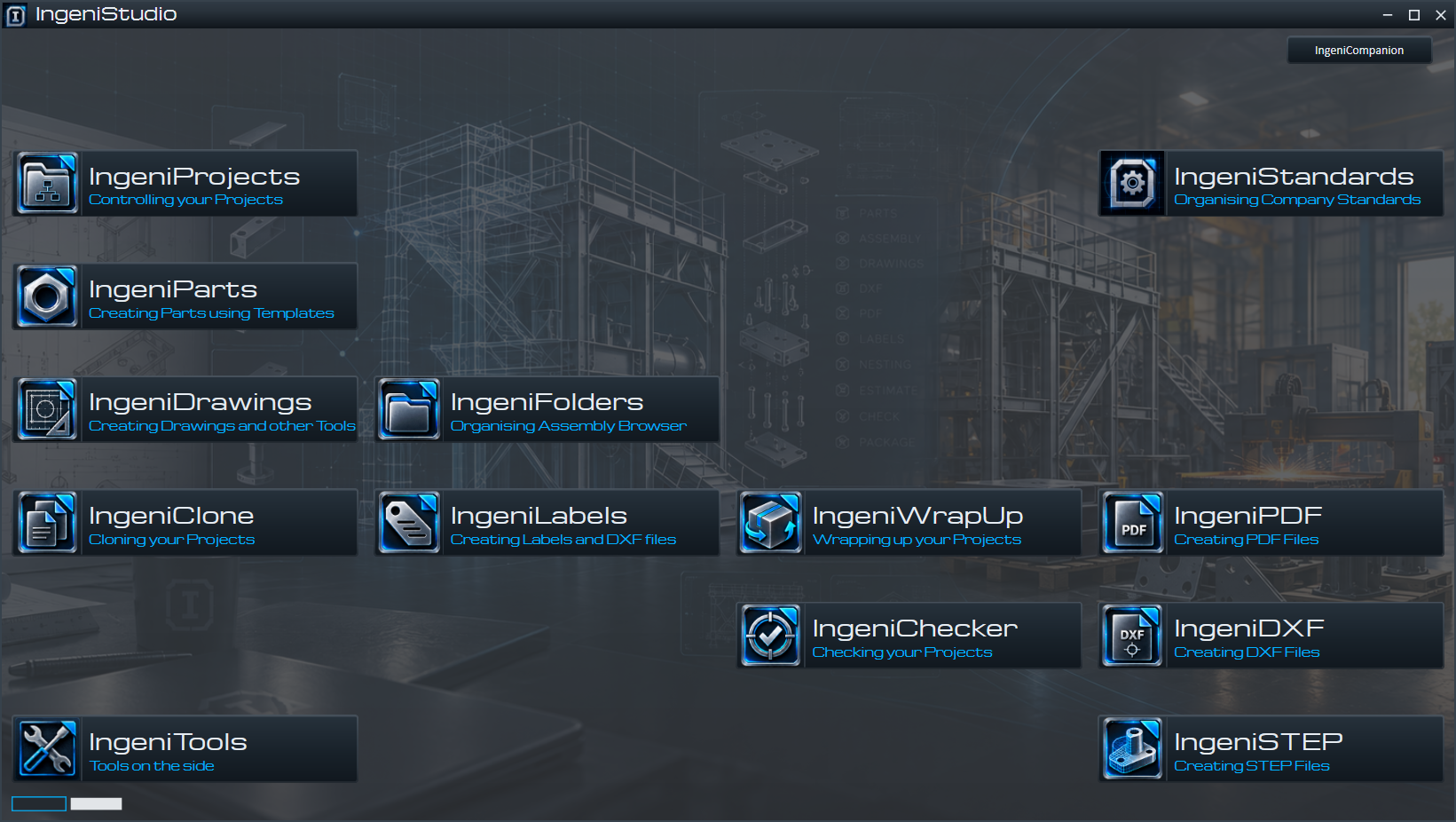
IngeniStudio brings related areas of the engineering workflow into one consistent product environment.

IngeniChecker
Project-level checking between the main assembly and drawing files.

IngeniParts
Create and edit supported template-based parts with configured materials and company property rules.
IngeniDrawings
Prepare company-configured drawing sheets and views, manage sheet names and create transmittal workbooks.

Company Standards
Configure company templates, properties, layouts and part conventions, then publish a version for project use.
IngeniClone
Clone Inventor assemblies, components and selected drawings with planned naming, reuse and reference updates.
IngeniFolders
Organize assembly occurrences and patterns into folders in the Autodesk Inventor Model Browser.
IngeniPDF
Collect Inventor drawing sheets and create separate, combined or per-drawing PDF files.
IngeniDXF
Prepare, review and export DXF files from Autodesk Inventor part views.

IngeniSTEP
Export Inventor parts and assemblies as STEP files, individually or in batches.
IngeniProjects
Manage project records, Company Standards assignments and project file locations in IngeniStudio.
IngeniLabels
Detailed product information is being prepared.

IngeniWrapUp
Apply project, revision, status and iProperty information across an Inventor assembly and its referenced models.

IngeniSheets
Visual drawing sheet navigation, management and review for Autodesk Inventor.

IngeniTools
Access document, component and parameter tools matched to the active Inventor document.
Project-level checking
IngeniChecker
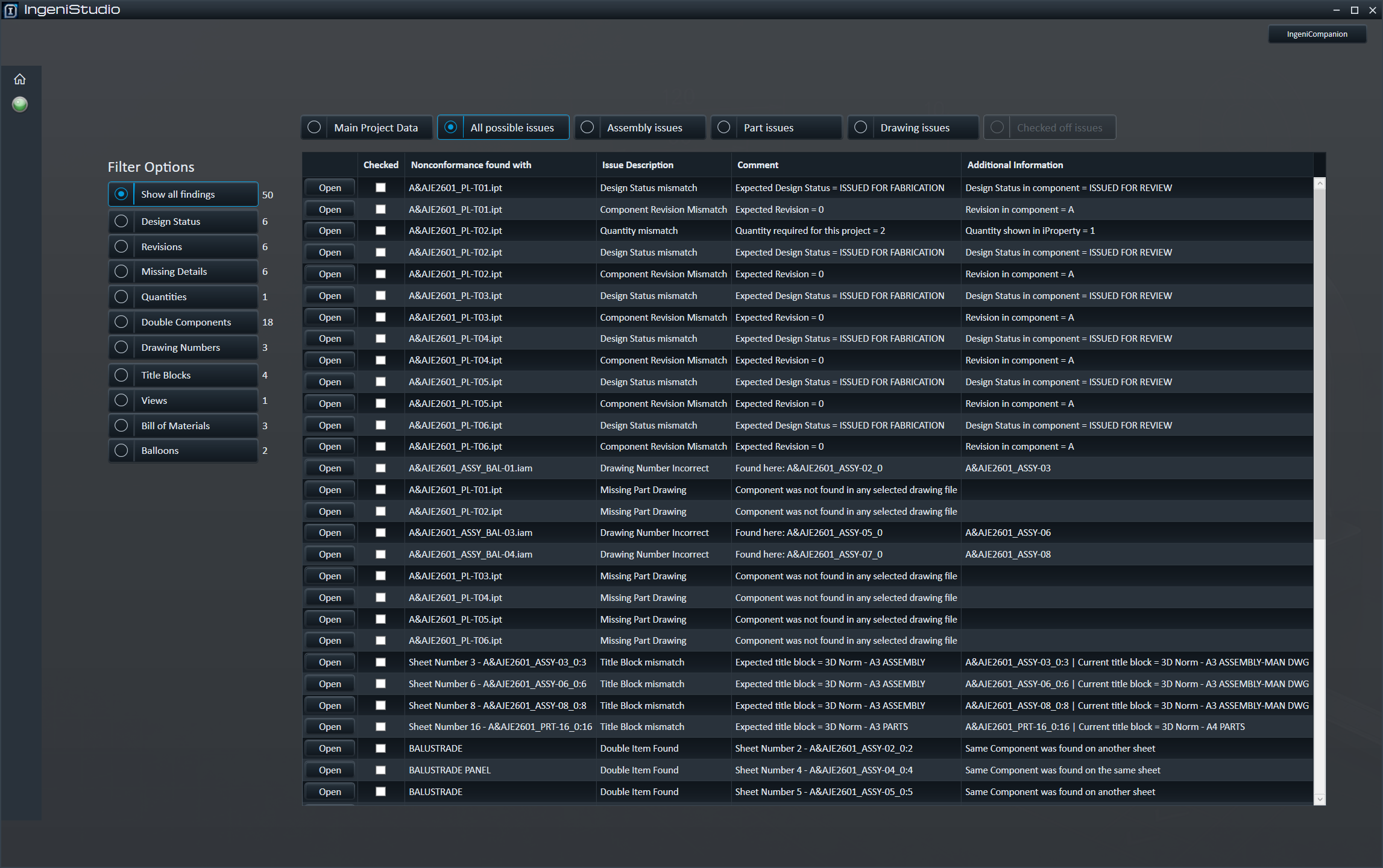
IngeniChecker checks the main assembly against the project drawing files and checks the project drawing files against the main assembly. It identifies potential issues for user review, confirmation or correction.
- Missing or duplicate items
- Drawing information
- Dimensions and constraints
- Revisions and design status
- Parts information
- Company Standards
IngeniStudio adapts to the drawing office's standards rather than requiring the drawing office to adopt IngeniStudio's standards.
Relevant areas may include the established documents, formats and rules used to release engineering information.
- Drawing templates
- Sheet formats
- Borders
- Title blocks
- Revision tables
- Parts lists
- Naming conventions
- Export rules
- Release requirements
Pre-launch status
IngeniStudio is currently in pre-launch development. The software and workflows shown on this website represent the current state of IngeniStudio. Development and testing are continuing, so some features, workflows and user-interface elements may change before the production release.
Functionality that is planned but not yet available will be identified as such.
Founding Customers
Production experience before broader release.
The limited Founding Customer programme is intended for companies willing to use IngeniStudio in real production environments, with closer onboarding and support in return for practical feedback. No positive testimonial is required.