

Consistent project information
IngeniWrapUp
Finish an Inventor assembly project with consistent project information.
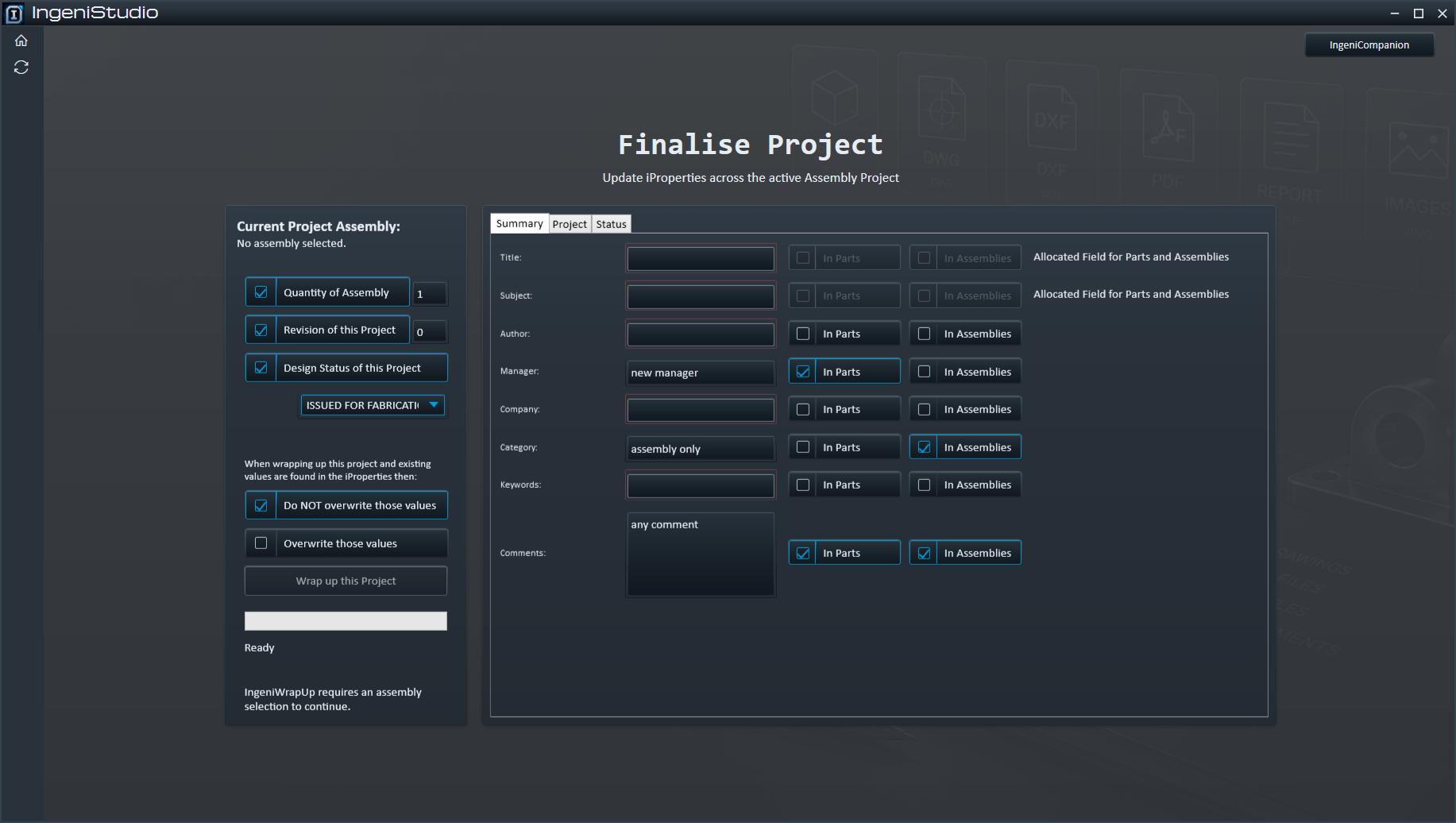
IngeniWrapUp applies project and iProperty information across an Autodesk Inventor assembly and its referenced part and assembly documents. Choose the information to apply, select which document types it targets, and control whether existing tabbed iProperty values can be overwritten.
Existing documents
Update the Assembly Project in Place
IngeniWrapUp is an information-update workflow, not an export module.
IngeniWrapUp does not create a separate project package or WrapUp file. It updates information in the selected assembly project and its eligible referenced part and assembly documents.
It does not rename project files or create renamed copies.
Focused workflow
Select → Configure → Apply → Review
Choose the existing assembly, configure the information and targets, apply the updates, then review progress and completion counts.
Choose the assembly
Use the active Inventor assembly or select an existing assembly.
Choose the information
Select project-wide updates and individual iProperty values.
Set targets and overwrite
Choose document types and overwrite behaviour, then run Wrap up this Project.
Follow the operation
Review progress and processed or skipped document counts.
Optional project updates
Apply Project-Wide Information
Enable only the project information that should be applied across the eligible assembly context.
Assembly/project quantity
When quantity updating is enabled, the entered assembly quantity is multiplied by each referenced component’s occurrence count.
Project Revision
Optionally apply the entered Revision as a separate project-wide update.
Project Design Status
Optionally apply a value from the configured Ingeni Design Status choices.
Tabbed information
Update Inventor iProperties
Editable information is organised into Summary, Project and Status groups so related values remain readable.
Document summary
- Title
- Subject
- Author
- Category
- Keywords
- Comments
Project and organisation
- Manager and Company
- Stock Number and Description
- Revision Number and Project
- Designer, Engineer and Authority
- Cost Center, Vendor and Web Link
Status and approval
- Status
- Design State
- Checked names and dates
- Approval names and dates
Where applicable, selecting a date field can populate today’s date when no date has been entered.
Per-field targeting
Choose Where Each Value Applies
Individual tabbed fields can target Parts, Assemblies or both where those targets are available in company configuration.
Apply an available value to eligible referenced part documents.
Apply an available value to the main and eligible referenced assembly documents.
Apply an available value across eligible part and assembly documents.
A value that belongs only on assembly documents can be targeted to assemblies without applying it to referenced parts. Not every field is necessarily available for both document types.
Existing information
Control Existing Values
Overwrite choice applies to the tabbed iProperty fields and is more precise than an all-or-nothing switch.
Preserve existing values
Existing non-empty tabbed iProperty values are generally preserved while eligible empty or default values can still be populated.
Replace existing values
Existing tabbed iProperty values can be replaced with the entered values.
Project-wide options remain separate. Quantity, Revision and Design Status are applied when enabled and are not governed by the tabbed-field overwrite choice.
Distinct concepts
Design Status and Design State
These values serve different purposes and are not interchangeable.
Project Design Status
Uses the configured Ingeni Design Status values.
Design State
A separate field with states including WorkInProgress, Pending and Released.
Document scope
Work Across the Assembly Project
IngeniWrapUp processes the existing model-document set; drawings are not updated through this workflow. References first encountered through a Phantom occurrence are skipped, so review the scope and quantities through nested assemblies.
The selected top-level assembly.
Eligible referenced assembly documents.
Eligible referenced part documents.
Documents that cannot be modified, including applicable read-only documents, are skipped.
Progress and completion
Review the Operation
Follow progress while the existing documents are processed in sequence.
Number of part documents processed.
Number of assembly documents processed.
Number of read-only documents skipped.
The completion information is not a detailed per-property audit. An error can interrupt a run, and earlier changes are not automatically rolled back.
Saving and output
Updates the Project — It Does Not Create Another Package
IngeniWrapUp operates on the existing Inventor assembly-project documents.
No separate output
No WrapUp file, exported project, separate package or renamed document copies are created.
Normal Inventor saving workflow
IngeniWrapUp applies the requested property changes to Inventor documents. Saving remains part of the normal Inventor document workflow; IngeniWrapUp does not explicitly save documents as part of the operation.