
Inventor drawing output
IngeniPDF
Create PDF files directly from Autodesk Inventor drawing sheets.
Collect sheets from the active drawing, add only the sheets you have selected in Inventor, or collect sheets from multiple drawing files. IngeniPDF gives you control over exactly what goes into your PDF output and how the files are created.
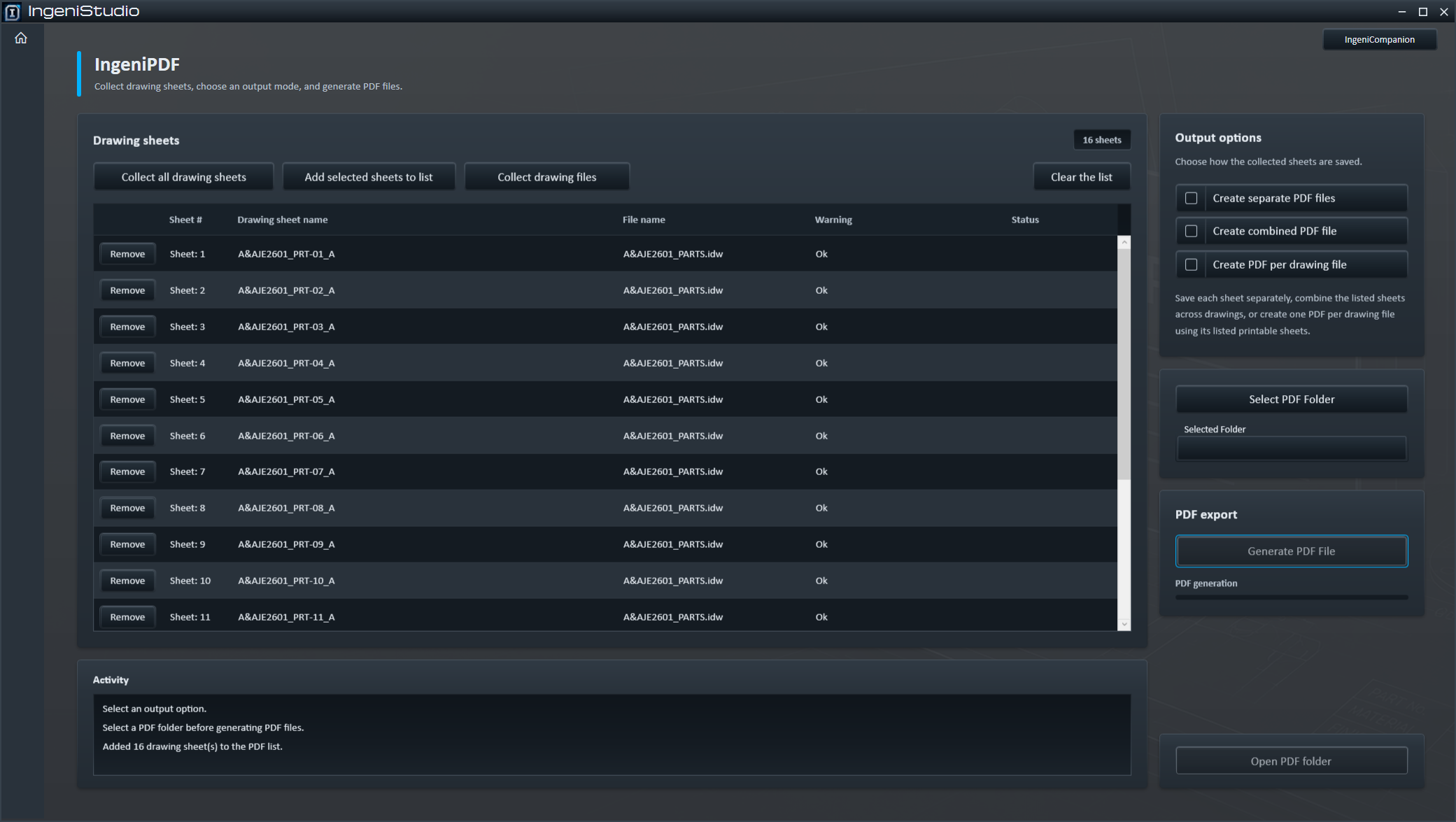
Output options
Create PDFs the Way You Need Them
Build the sheet list first, review what will be exported, then choose the output format and destination.
Separate PDF files
Create one PDF for each listed drawing sheet.
Combined PDF file
Combine the listed sheets into a single PDF, including sheets collected from multiple drawings.
PDF per drawing file
Create one PDF containing the listed sheets for each source drawing.
Sheet collection
Build Your PDF List
Choose the collection method that matches the drawing sheets you need. Replacing the list and adding to it remain distinct actions.
Collect all drawing sheets
Collects the available sheets from the active Inventor drawing and replaces the current list.
Add selected sheets to list
Adds the sheets currently selected in Inventor without removing sheets already in the list.
Collect drawing files
Allows the user to select multiple Inventor .idw or .dwg drawing files and collect their sheets.
- Individual sheets can be removed from the list.
- The complete list can be cleared and rebuilt.
- IngeniPDF avoids adding the same drawing sheet to the list more than once.
Review and control
Review Before You Generate
The sheet list shows information about each collected sheet, its source drawing and relevant warnings. Review the intended output and remove any sheets that should not be included.
Exclude from printing
Sheets marked Exclude from printing are identified and handled according to the selected export mode.
Exclude from count
Sheets marked Exclude from count are shown with a warning but are not prevented from being exported for that reason alone.
Controlled output
Generate the PDF Files
- Choose an output mode.
- Select the destination folder or combined PDF filename.
- Review any validation messages.
- Choose Generate PDF File(s).
IngeniPDF displays export activity and progress while files are being created. Sheet rows can report export status where available.
Open PDF folder opens the destination folder when the operation is complete.
Mode-specific output
File Naming
Each output mode uses its own naming behaviour.
Separate PDF output
IngeniPDF creates the filename from the drawing sheet name and checks that the resulting filenames are unique before generation can begin.
An existing sheet PDF is moved to IngeniPDF Moved Files. An earlier moved copy with the same name can be replaced.
PDF per drawing file
The source drawing filename is used for the PDF filename. If a file with that name already exists, IngeniPDF creates a numbered filename instead of replacing it.
Combined PDF
The user chooses the filename and destination. Combined output can replace the selected final file.
Drawing sources
Works with Your Inventor Drawings
IngeniPDF works directly with Autodesk Inventor drawing documents.
Start with the active Inventor drawing, or collect sheets from other .idw and .dwg drawing files. Those sheets can be processed without preparing each drawing individually beforehand.
IngeniPDF opens source drawings in Inventor as required while processing them.
Before issue, open the resulting PDFs and confirm the actual page set, content and page order, particularly for combined output from multiple drawings.