
Project records and context
IngeniProjects
Manage the project context behind the workflow.
IngeniProjects provides a central place to create and maintain Ingeni project records, select the active project, assign Company Standards and associate each project with its working folder.
Project record, not project files
A Central Record for Project Context
An IngeniProjects project is a record used by supported workflows. It is not an Autodesk Inventor project file.
Project information
Project Number, Project Name and configured project-detail fields.
Standards and location
Company Standards assignment and an associated existing project folder.
Workflow status
Open or closed record state and the active-project state.
IngeniProjects creates a project record. It does not create .ipj files, CAD files or a project folder structure. The user associates the record with an existing folder.
Project lifecycle
Create → Configure → Activate → Work → Close/Reopen
Maintain the record and its context without representing record state as file management.
Create the record
Enter the required project identity and save a unique record.
Set the context
Maintain applicable details, Company Standards and project folder.
Choose the active project
Set the project that supported workflows should use as context.
Use supported workflows
Work with the project context where a verified integration applies.
Maintain record state
Close records that are no longer current and reopen them later.
New project
Create a Project Record
Create the required project identity first, then add the context that applies to the company workflow.
Project Number
The Project Number must be unique. Once the record is saved, the number becomes read-only.
Project Name
Provide the working name for the project record.
Project Line and Title Line
Additional fields can be available when enabled through company settings; they are not universally required.
Optional project fields allow the workflow to follow company requirements rather than forcing every company to use the same project information.
Open-project details
Maintain Project Information
Keep applicable information current while preserving the saved Project Number as the record identity.
Project lists
Keep Current and Completed Work Organised
Use the view that matches the project-record state and the work being performed.
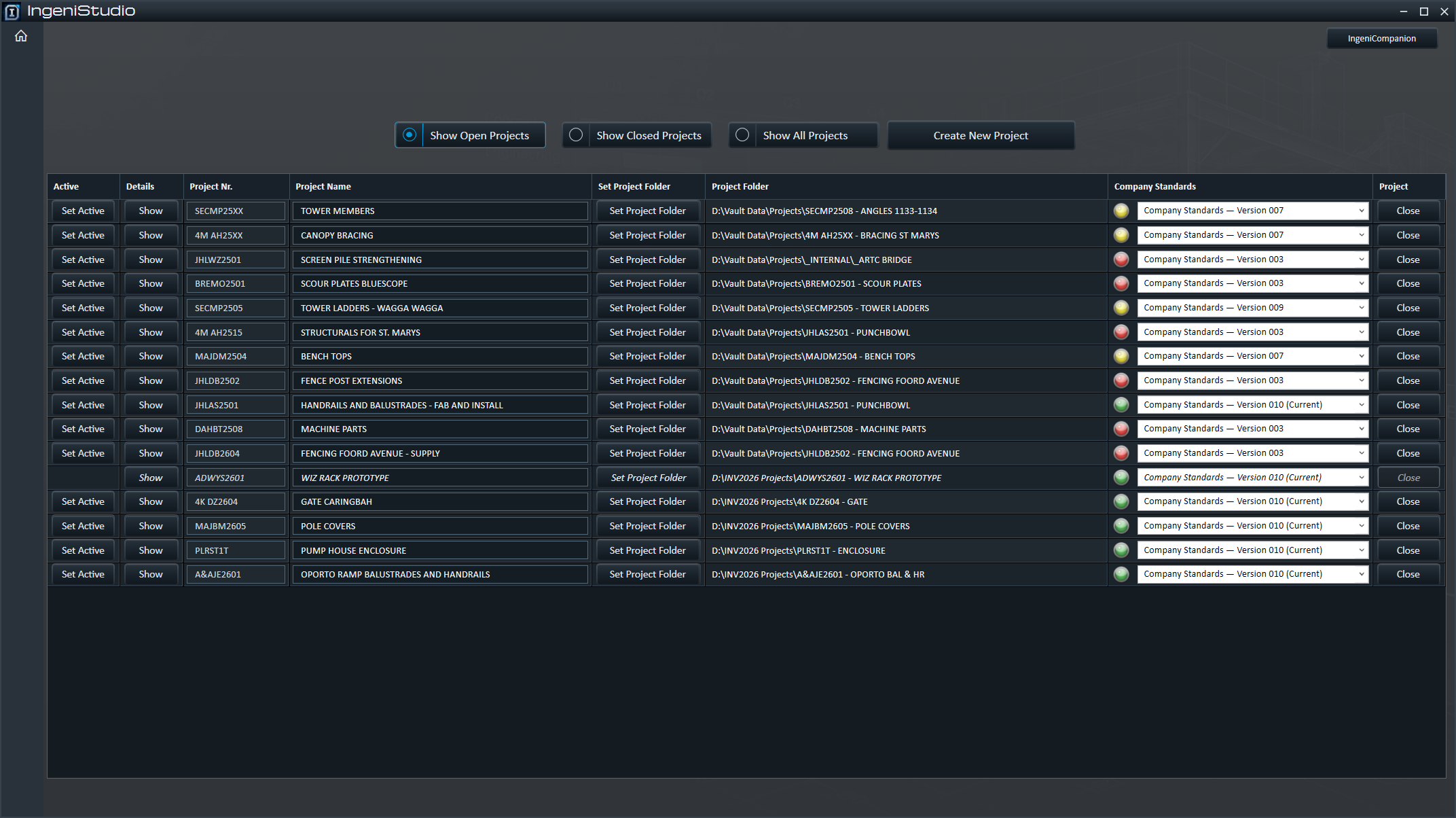
Open Projects
The working list for current project records and the place to maintain applicable open-project information.
Closed Projects
Review closed project records and reopen them when required.
All Projects
Inspect the overall project list. Closed and All views are not presented as having the same editing operations as Open Projects.
Active context
Set the Active Project
An open project can be set as the active Ingeni project.
The active project provides context for supported Ingeni workflows.
Creating a project does not automatically make it active.
The active project cannot be closed through the normal Close control until another project has been made active.
Standards over time
Assign Company Standards
Associate the project record with a published Company Standards version for supported future work.
Select the current published version
When a current published Company Standards version is available, it can be selected for the new project.
Change to the current version
The assignment can be changed to the current published version, with confirmation requested before the existing assignment changes.
The project list identifies standards assignments that are current, outdated, unavailable or missing. A working package must be published before it can be assigned to a project.
The change is not retroactive. Changing the assignment does not modify existing parts or drawings. New parts and future drawing-generation operations use the selected Company Standards version where those workflows apply.
Existing working location
Associate the Project with a Folder
Set Project Folder associates the project record with a folder selected by the user.
The selected folder must exist when it is chosen. IngeniProjects records that association; it does not create the folder structure or move existing files into it.
Changing the associated folder changes the configured location used by supported future workflows. Files that already exist are not moved.
Verified integration
Project Context for New Parts
In the verified IngeniParts plate and steel-profile creation workflows, the configured IngeniProjects folder is used as the starting location for the new part’s save dialog.
- The user can still change the filename and save location before saving.
- If no project folder is configured, these verified workflows can use the active Inventor project’s Workspace folder.
- This relationship is not claimed for every module or output.
The configured folder is a starting location, not a mandatory destination.
Record state
Close and Reopen Projects
Keep the current list focused while retaining completed or inactive project records.
Open project records can be closed when they are no longer current. Closed records remain available and can be reopened later.
Closing a project does not delete the record, archive or move CAD files, move its folder, or remove its Company Standards history.